Guide · 10 min read
How to hire a developer in India
A protective, step-by-step guide for a first-time buyer. It takes about ten minutes and can save you months.
The full explanation
What is a coaching institute app and what does it do?
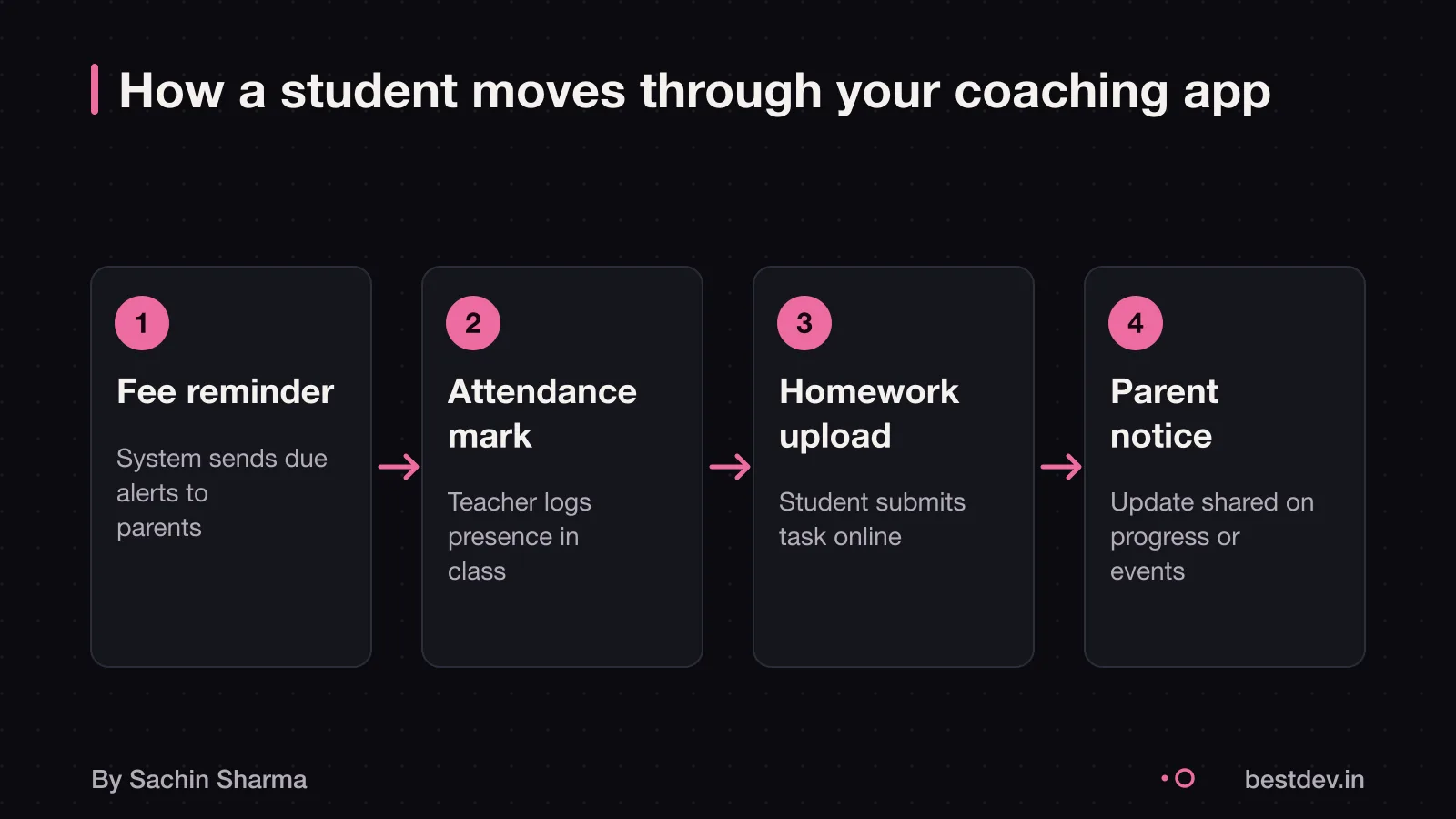
A school app serves parents with tasks like fee payment, attendance and report cards across hundreds of families. A coaching app serves students with batches, tests, recorded lectures and doubt-solving. For coaching apps, your brand on the student's phone can be a selling point.
As an estimate, assuming auto-reminders and UPI payments are used, they may reduce fee delays caused by forgetfulness. One fee-software vendor reports that about 83% of school-fee defaults come from forgetfulness and missing information, not from inability to pay. Fee-software vendors report meaningful jumps in on-time collection and sharp drops in the office's manual work once these are in place. Your team may spend less time chasing fees and more time improving teaching.
Custom app vs ready-made software: which is better?
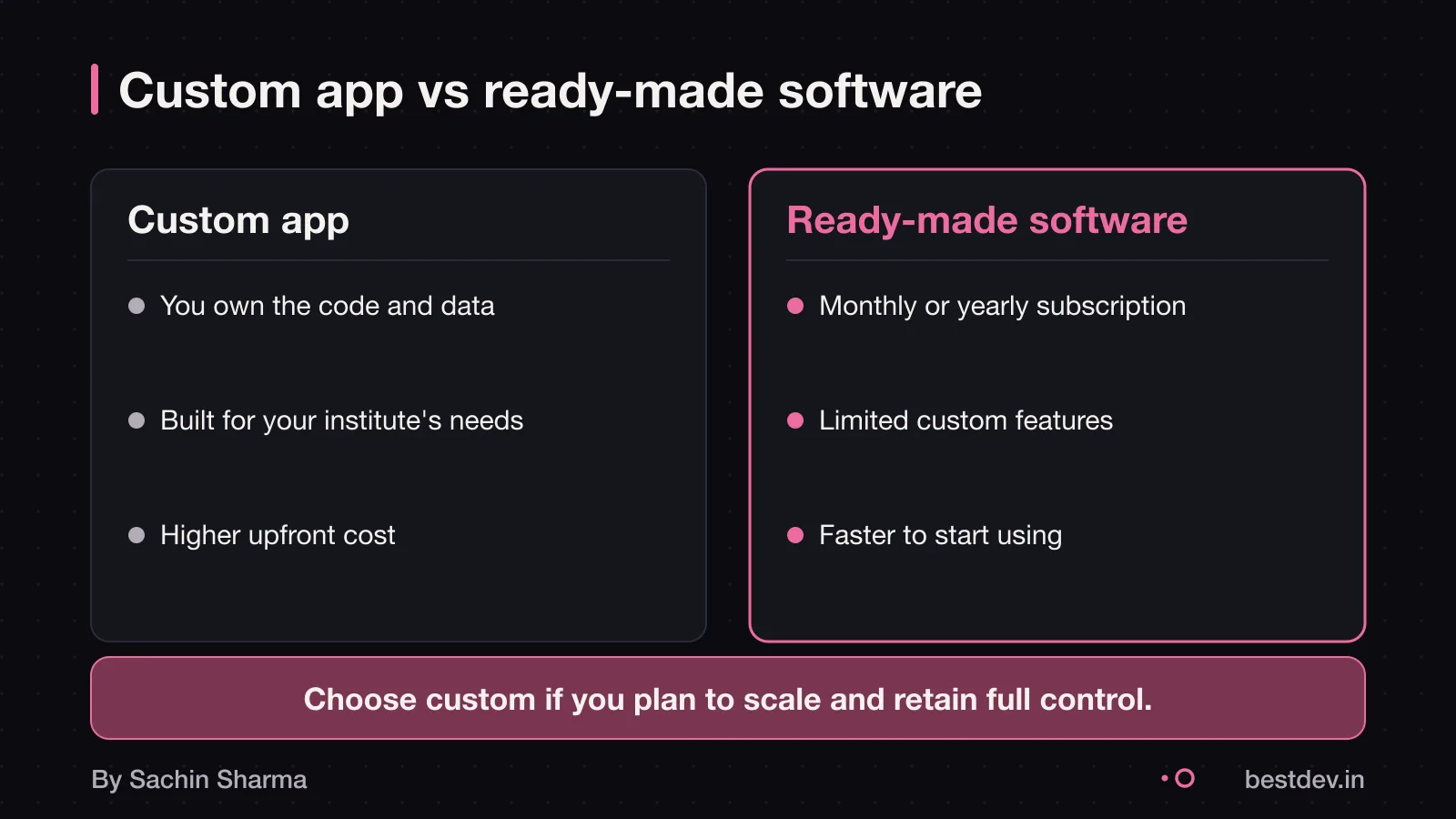
A ready-made software like Teachmint or MyClassCampus lets you go live within days and includes features like online fees and attendance. For a school with 800 students, a mature ERP like Teachmint or MyClassCampus can cost in the range of ₹1 to ₹1.5 lakh per year. Depending on modules, and includes online fees, attendance, a parent app, reminders and a decent admin panel. You get a working system in days, not weeks.
A custom app may be worth it if you need control over branding, though it usually costs more. Building from a proven template costs ₹15,999 to ₹29,999 and takes one to three weeks. This gives you your own branded app with basic functions, but less flexibility than a full custom build.
With ready-made software, you gain speed and support but lose branding and control. With a template or custom app, you gain ownership and branding but pay more in effort and time. Reusable parts cut cost but limit changes later.
If you are starting small, build or buy based on your budget and need for control. For a first step in digitisation, see what to digitise first for a similar framework.
How much does it cost to build a coaching institute app?
Takes 1 to 3 weeks. A branded parent-and-student app with fee payment, attendance and notices is available as a fixed-price product. This price is for a branded app with features like fee payment, attendance, homework, notices and timetable. It also includes an admin panel your office can run. It suits one campus that wants parents informed and payments online.
A full custom ERP app with multi-branch support, payroll, transport tracking and other features can cost ₹3 lakh to ₹25 lakh. This range is for a custom-built system from scratch, with advanced modules such as exam management, report cards, transport tracking, library records and payroll. It fits large coaching groups with multiple branches, not single centres.
Some developers charge extra for training or third-party tools. Fixed-price models lock in the cost but need clear scope upfront. If you change the plan later, you may pay more. Time-and-material models charge by the hour and suit projects where features evolve.
For a clear cost estimate based on your needs, see how app cost is built.
What increases the cost and what hidden fees should you watch?
Features, security and scalability may affect the cost of an MCQ exam app. The number of platforms may add cost due to separate release and testing paths. Features are a strong driver of cost for MCQ exam apps. Security is a primary cost driver. Medium scale platforms serving multiple institutions or coaching centers require more solid user management, scalability planning, and analytics features, increasing development cost.
Supporting multiple platforms increases ongoing costs. You have four separate release and testing paths for Android, iOS, backend and an admin panel, each with its own risk of breaking independently. Maintenance cost may rise with more frequent releases, as each one needs quality checks.
Hidden fees include app store costs. The Apple Developer Program costs $99 per year (about ₹8,500) to keep your iOS app live. Google Play has a one-time $25 fee (around ₹2,100) with no renewal. If you sell subscriptions or digital content through the app. Both stores take a 15% commission on earnings under $1 million per year for most developers, rising to 30% above that. Payment disputes are another risk. As of 2026-06-15, 40% of projects faced delays due to payment disputes. Agree on payment terms and milestones early.
How long does it take to build the app?
A template-based coaching institute app takes 1 to 3 weeks to build. The exact time may vary based on developer workload and content readiness, but specific factors are not known.
MCQ exam software development cost depends on many factors including feature depth and security level. Scalability is another major factor in MCQ exam app development cost. The scale at which an MCQ exam app operates directly impacts cost.
Providing content early may help speed up the process, but what exactly to provide is not known. Work closely with your developer to agree on a realistic timeline. If they promise less than one week, ask what corners are being cut.
Who owns the app code and can you take it elsewhere?
As the author or their employer is usually the first owner of copyright unless otherwise stated in writing. If you hire a freelancer and there is no written agreement. The freelancer may own the copyright to the code they write, as the default position under UK contracting guidance. Computer software can be registered as a literary work.
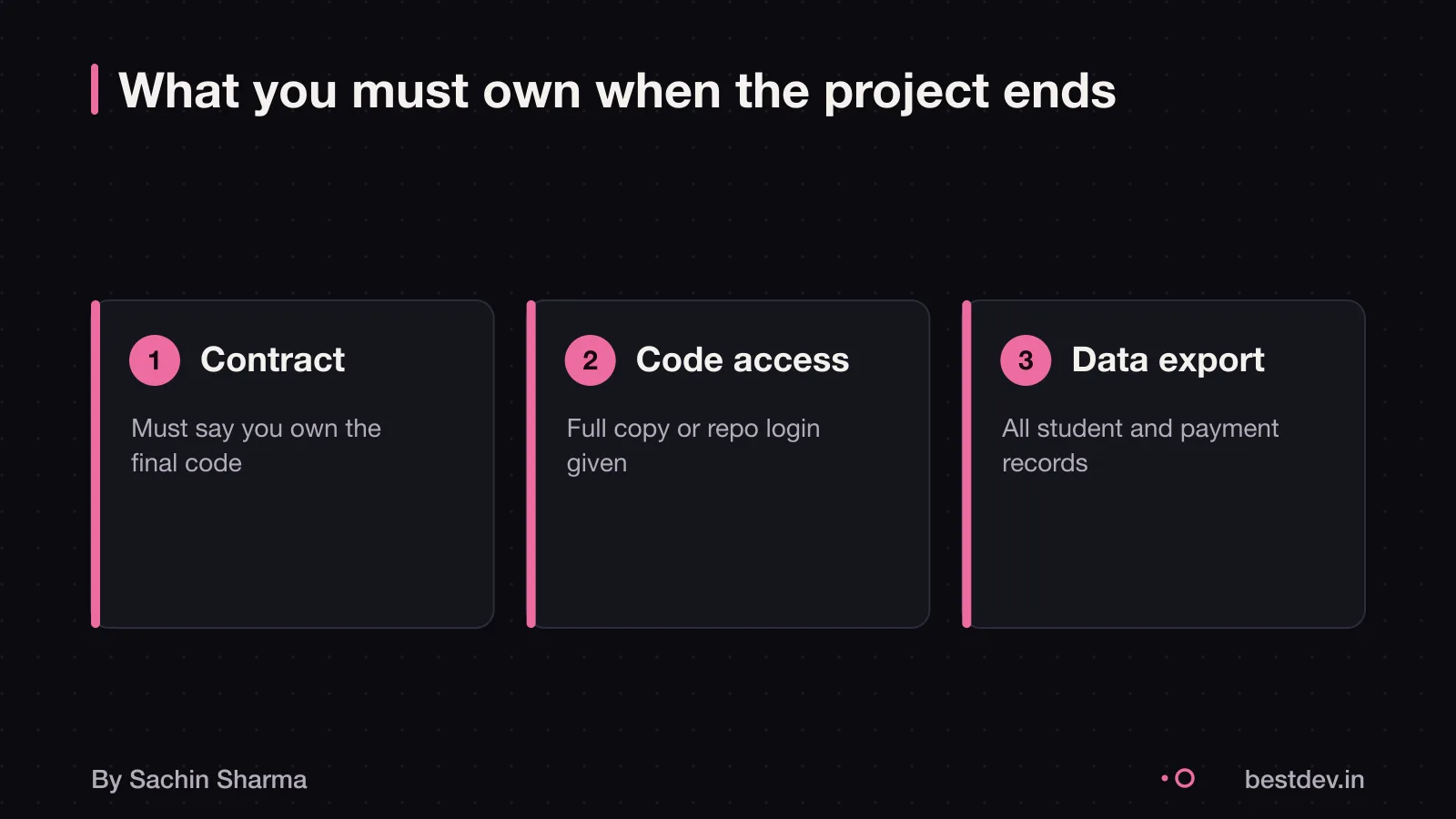
Your contract should state who owns the source code and intellectual property, as ownership is not automatic. It can include a clause that assigns copyright to you. Because without such a clause the author of the code or their employer usually owns the copyright. Do not rely on verbal promises. Even if the developer gives you the code files, copyright ownership may still stay with them unless the contract says otherwise. Some commercial software contracts specify clearly who owns the copyright.
Without a written agreement, you may have only an implied right to use the app. But rights to modify or share it may not be clear. For example, if the developer stops working with you. You may not have the right to modify the code or hire someone else to fix bugs or add features, unless your contract grants those rights. That is why you should confirm ownership in writing, because if the contract does not specify. The freelancer may keep ownership by default as per UK guidance for freelancers.
If you want to switch developers later or sell your institute, you should own the code. Always ask: “Will I get full rights to the source code?” and check the contract before signing.
can I get the source code? This guide explains how to request and verify the code after delivery.
When should you not build a custom app?
Do not build a custom app if no parent has yet paid you online. Building your own app before a single parent has ever paid online is money spent ahead of the need. Wait until parents are already using their phones to message you about fees, schedules or receipts. Until then, consider using tools like WhatsApp and Google Forms. These may help assess whether your audience is ready. You may be ready to build when parents or students frequently reach for their phones to deal with you. A custom app may make sense when app use is steady each month and rented apps fall short. You might want your own name on the home screen, full control over fee rules, and ownership of student data without per-transaction fees. Until those needs arise, stick with simple tools.
When this advice does not apply to you
When this advice does not apply to you
You can skip the student lifecycle focus if you are building a simple tool. Such as a brochure website or a basic timetable viewer, that does not manage student progress, attendance or payments. In such cases, deep domain knowledge is less critical.
Hourly billing may be acceptable if you hire a freelancer for small, well-defined tasks like fixing a bug or adding a single feature. However, for ongoing work, this model lacks the predictability and continuity of a retainer.
A freelancer might be enough if your institute is small and the app is not business-critical. But if downtime or delays affect operations, an agency retainer or in-house developer offers better reliability.
Questions people ask
What should I check before hiring a developer for a coaching institute app?
Check the developer's portfolio, references, and conduct a practical test and behavioural interview. 90% of candidates' portfolios are checked for relevance, 85% of candidates undergo checks. 73% of employers prefer practical assessments, and 70% of hiring managers favour behavioural questions. This helps avoid poor fit and missed deadlines.
What is a fair way to pay for a coaching institute app?
Milestone payments are fair and preferred by 75% of teams. Avoid hourly payments for fixed scope work. A clear payment structure increases project success to 60%. Tie payments to deliverables like design approval or feature completion.
What happens to my code and accounts if we stop midway?
You only own the code if the contract says so. Without a written agreement, the developer may legally own the copyright. Ensure your data is exportable and stop payments if the developer vanishes. Check this with your lawyer before signing.
Can I start with a simple app and add features later?
Yes, use a time-and-material or dedicated team model for evolving needs. Plan for scalability from the start. This avoids costly rework when adding features like exams or progress tracking later.
Is Flutter good for a coaching institute app?
Yes, Flutter offers fast performance and one codebase for mobile, web and desktop. It can cut testing and update effort roughly in half compared to separate platforms, as one codebase replaces two. This lowers long-term maintenance cost.
Do I need GST registration if I charge for app access?
Yes, you need GST registration if you charge for access. PAN is mandatory for GST registration. You can opt for Composition Levy if your turnover stays below the threshold. Registration is effective from the date you become liable if applied within 30 days. Check this for your case with a chartered accountant.
How do I know if a developer's timeline is realistic?
A template-based coaching app for one school or coaching centre takes 1 to 3 weeks and costs ₹16,000 to ₹30,000 when built from a proven template. As per a vendor's fixed-price offer for a branded parent-and-student app with fee payment, attendance, notices, homework and timetable. If your project is similar but quoted longer, ask for a phase breakdown. Timelines depend on feature depth and security needs. Compare to standard benchmarks.
A protective, step-by-step guide for a first-time buyer. It takes about ten minutes and can save you months.
01 · Check fit
Is an app right for your stage?
An app makes sense when parents or students already reach for their phones to message about fees, schedules or receipts. If all communication is still verbal or over WhatsApp, wait. Rent a ready-made tool first.
Building an app before anyone pays online is spending ahead of need. Test demand with a shared Google Form or a free plan on Teachmint.
Do thisRent first. Build when phones are already out.
02 · Scope it
Define what must work on day one
Write one page: who uses it (students, parents), the problem it solves (fee reminders, attendance), and three things that must work on day one (fee payment, notice board, homework).
Avoid vague lists. A clear scope prevents 75% of payment disputes.
Do thisThree must-haves. No feature wishlist.
03 · Pick type
Choose between template, custom or rent
A template app costs ₹16,000–₹30,000 and ships in 1–3 weeks. A full custom ERP costs ₹3–25 lakh. Ready-made tools like Teachmint cost ₹1–1.5 lakh/year.
Templates suit institutes with under 1,000 students and basic needs. Custom is for multi-branch groups needing report cards, payroll or transport.
Do thisMatch cost to real need, not ambition.
04 · Find devs
Shortlist three with real apps
Look for shipped apps in the Play Store, not just screenshots. Ask who writes the code. Freelancers are cheaper but risk unavailability. Agencies offer SLAs.
Call one past client. It takes ten minutes and reveals more than a portfolio.
Do thisShipped app > screenshot. Past client > promise.
05 · Verify code
Test what they built before
Install two apps they built. Ask what they would improve. A good answer shows they understand real usage, not just features.
If they hesitate or deflect, move on. Ownership of past work matters for future clarity.
Do thisAsk one hard question about their own app.
06 · Agree terms
Own the code and the accounts
State in writing: what is included, payment milestones, change pricing, and who owns the code. Make sure the app store accounts and code repo are in your name from day one.
Without this, recovering your data or switching vendors later becomes legally and technically hard.
Do thisIf it’s not written, it’s not yours.
07 · Pay smart
Tie payment to testable milestones
Never pay the full amount upfront. Tie payments to milestones you can test: login works, fee payment works, notice board posts.
75% of teams prefer milestone payments. It aligns both sides on progress, not hours.
Do thisTest before you pay. Not after.
Quick answers
Can I build it myself using a tool?
Yes, if your needs are basic. Tools like Glide or Adalo let you build simple apps from spreadsheets, but they can’t handle complex workflows like exam scheduling or instalment fees.
Should I hire a freelancer or an agency?
Freelancers cost less but risk unavailability. Agencies charge more but offer SLAs and team continuity. Choose based on how critical uptime is to your business.
What if I want to add features later?
Adding features mid-project raises cost. A fixed-price contract protects your budget but locks scope. A time-and-material model lets you evolve but costs more.
Who owns the app after it’s built?
By default, the developer owns the code unless the contract says otherwise. Always state in writing that you own the final product and all related accounts.
Do I need an admin panel?
Yes. An admin panel lets you update fees, send notices and view reports without calling the developer. It’s part of the core cost.
What about app store fees?
Google Play has a one-time $25 fee. Apple costs $99/year. Both take 15% commission on digital sales under $1M/year.
How much does upkeep cost?
Annual maintenance is 15–25% of the build cost. Monthly support starts at ₹15,000. Budget for bugs, updates and minor changes after launch.
Keep going