Project · Productivity
Loopin: what it solved and how

Gamified habit tracker merging RPG mechanics with offline data ownership and atomic Google Drive sync.
The full explanation
What offline-first means for a habit tracker
An offline-first app stores your data on your phone first, so you can track habits even without internet. It syncs later when the connection is good. This design can help the app work better on slow networks and reduce data use. By syncing only under good conditions like when charging or on Wi-Fi.
For a habit tracker, this is better because your entries are private and frequent. You do not wait for a server to respond each time you log a habit. The app feels quick and reliable, even underground or on a train.
It can upload changes to Google Drive when charging or on Wi-Fi, to save battery and data.
If you lose your phone, your data may be lost unless it was already backed up. Google Drive sync helps, but only if the last changes were uploaded.
What an API is explains how apps talk to services like Google Drive.

What you give up by not using a server
You lose features that need live server coordination. Real-time collaboration, push notifications and centralised user search are not possible without a server. These need a live backend to manage state and trigger alerts.
Your app cannot auto-sync in the background without user action. Sync also fails if the user lacks read and write permissions for the folder. This breaks the “always up” feel of cloud apps.
You also depend on Google Drive’s uptime and permission rules. If the configuration folder or local cache directory is not accessible, Google Drive may not start. These issues are outside your app’s control.
How sync to Google Drive works
Loopin connects to Google Drive using the official Drive API, which lets your app store data in the cloud through Google’s secure system. This link is set up using OAuth 2.0, so you grant permission safely without sharing your password. The app creates a dedicated folder in your Drive. This keeps your habit data separate from other files. It stores data in a dedicated folder so the app cannot access all user content in Drive.
If a file is corrupted due to third-party editing, you can make a copy of the original in Drive Web. Delete the invalid file on your computer. However, this relies on stable internet at the time of sync.
You can share habit data with others. This is done by sharing the file or folder through Google Drive. This allows collaboration. Shared drives are also supported. Multiple users can access and work on the same data. For more on how third-party tools like payment or sync services are added, see How integrations work in apps.
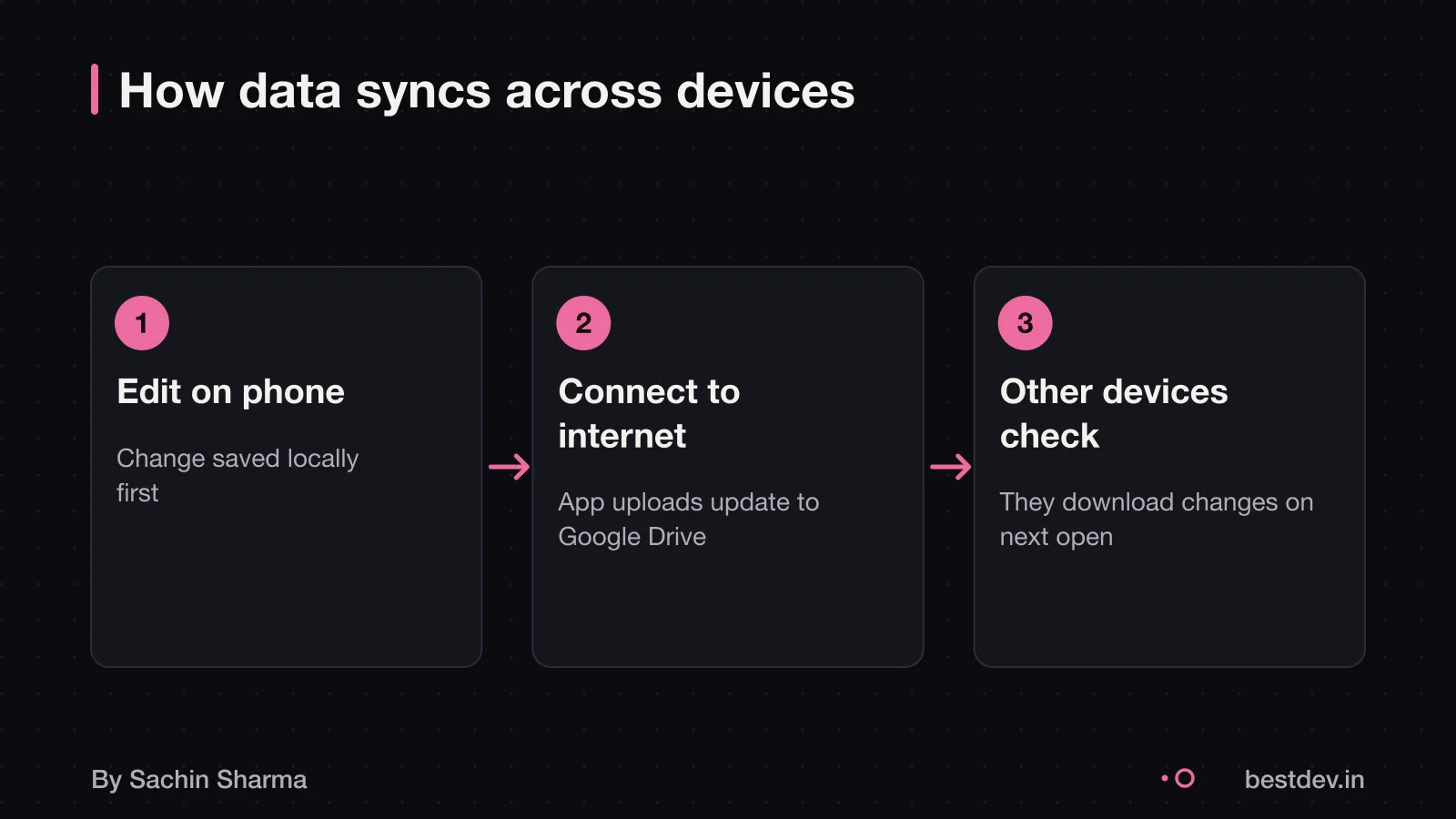
What happens when two devices edit the same habit
If you change the same habit on two devices while offline, the system detects the clash when both sync to the server. For scalar fields like a habit name or target, if there is a conflict. The server value is kept and the incoming change is rejected.
For list fields, new entries from a device are appended to the existing list on the server, which can keep duplicates. If a device adds a new field to an item or changes a field that is null. That change can merge into the existing record. This keeps data safe. But recent edits on a scalar field may be lost. You cannot manually pick which edit wins. The system follows fixed rules. It resolves conflicts without asking you.
For example, if you change a habit name on two phones at once, the server keeps its existing value and rejects the new one. But if you mark "Done" on both, both entries appear in the log. This design avoids complex merge screens. It limits control over conflicts.
Who owns your data in Loopin
Since Loopin collects no data, as stated on Google Play, your habit records are not shared or collected by the developer. You can request that your data be deleted through Google Play’s app controls. Data moving between your device and Google Drive is encrypted in transit. You can move your data out at any time by downloading the backup file from Google Drive. For your rights under Indian law, see the DPDP Act consent for apps.
Can you move your data out of Google Drive
Yes, you can download your data from Google Drive if it has not been deleted. This means your habit records in Loopin may be downloadable if not deleted, depending on your account type and settings. But if you use a work or school account, your admin may limit what data you can download. So check your access before relying on export.
For organisations, Google Workspace super admins can migrate data including documents and calendars. This helps when shifting teams or leaving a company. But regular users cannot force a full export if policies restrict it.
MojoDocs runs 1,100+ file-processing tools locally using WebAssembly.
Cost and effort to build
The cost and time to build an app like Loopin are not known, as no evidence or founder fact gives a figure. Without data on features, team size or development speed, any number would be a guess. What drives the price is also not published. You should ask your developer for a breakdown by feature and platform. This will help you see what each part costs and where time is spent. For example, offline sync, data conflict rules and Google Drive integration may take more effort than basic screens. Since Sachin works directly with clients, you can contact him to discuss your idea and get an estimate.
What features need a server?
Offline-first apps like Loopin skip the server, but some features need one. Real-time chat, push notifications and live analytics require a backend to work. You cannot add these later without rebuilding the app. If your idea needs instant updates or team collaboration, this design is not right.
Server-side features such as access controls, audit logs or scheduled tasks do not run in an offline-first app. You miss admin dashboards and automated reports. If you need to track user actions or run background jobs, you must use a server.
Sharing data safely is hard without a backend. Google Drive sync needs full folder access. You cannot share one habit or limit what others see. If your app must control who sees what, avoid this design.

What to ask your developer
Ask your developer how your data will sync and who owns it. Check if the app stores data only on your device by default. Confirm that sync uses a method you control, like Google Drive, and not a private server you cannot access. Insist on a clear rule for what happens when two devices change the same habit at once.
Review the quote for any line item that ties your data to a hosted backend. Ask for proof that you can still use the app fully if you stop syncing. Make sure the developer documents the sync design and conflict resolution in plain terms, not technical jargon.
Related reading: MojoDocs: privacy-first tools, Build or buy a quick commerce app.
Questions people ask
What does Loopin mean for a business owner?
Loopin stores data on the device first, then syncs to Google Drive when online. Whether this design suits business collaboration is not confirmed by evidence.
What do I need to decide first?
You must choose between fast local access and live network features. An offline-first app shows data right away without internet, but cannot support real-time updates or shared dashboards. Pick based on whether your users need instant sync.
What can go wrong?
Sync fails if Google Drive lacks read and write permissions for the folder or config files. It also fails if the device runs out of space or Drive is down. These stop local changes from reaching the cloud.
Is Loopin free to use?
Yes, Loopin is free to download and use from Google Play, with no in-app purchases mentioned. It has over 100 downloads as of 2026. You do not pay to install or run it.
How is data encrypted?
Data is encrypted in transit. On your phone, it is protected only if the operating system encrypts local storage.
Can creators earn with Loopin?
No, Loopin has no built-in way to earn money. There are no ads, subscriptions or paid features. It is a tool for tracking habits, not a business platform.
Is Loopin safe for Indian businesses?
The DPDP Act requires lawful purpose and user consent for personal data processing, or for certain legitimate uses. Whether Loopin follows these is not stated in the evidence. But since it stores data in Google Drive, check if cross-border transfer rules apply. Check this for your case with a data protection officer.
How much does an app like Loopin cost?
The cost to build an app like Loopin is not known, as no evidence gives a figure. Ask your developer for a breakdown by features such as offline sync, UI screens and Google Drive integration. This helps compare quotes.
How long to build such an app?
The time to build an offline-first app like Loopin is not known, as no evidence states it. Ask your developer for a timeline split by milestones such as design, core sync logic and testing. This makes progress clear.
Can I add a server later if needed?
There is no evidence on migrating from offline-first to a server-based app. If you think you may need live features later, ask your developer now whether your data model and sync rules allow a future switch.
The thinking
One decision worth defending
- 01
Problem
A habit app that works offline and gives users full control of their data, without locking them into a server-dependent model.
- 02
Decision
Use local storage (Hive) synced to the user's own Google Drive, avoiding a central server.
- 03
Why it holds
Offline-first removes dependence on connectivity. Syncing to the user's Drive avoids running a backend, storing user data, or managing accounts.
What it includes
Built
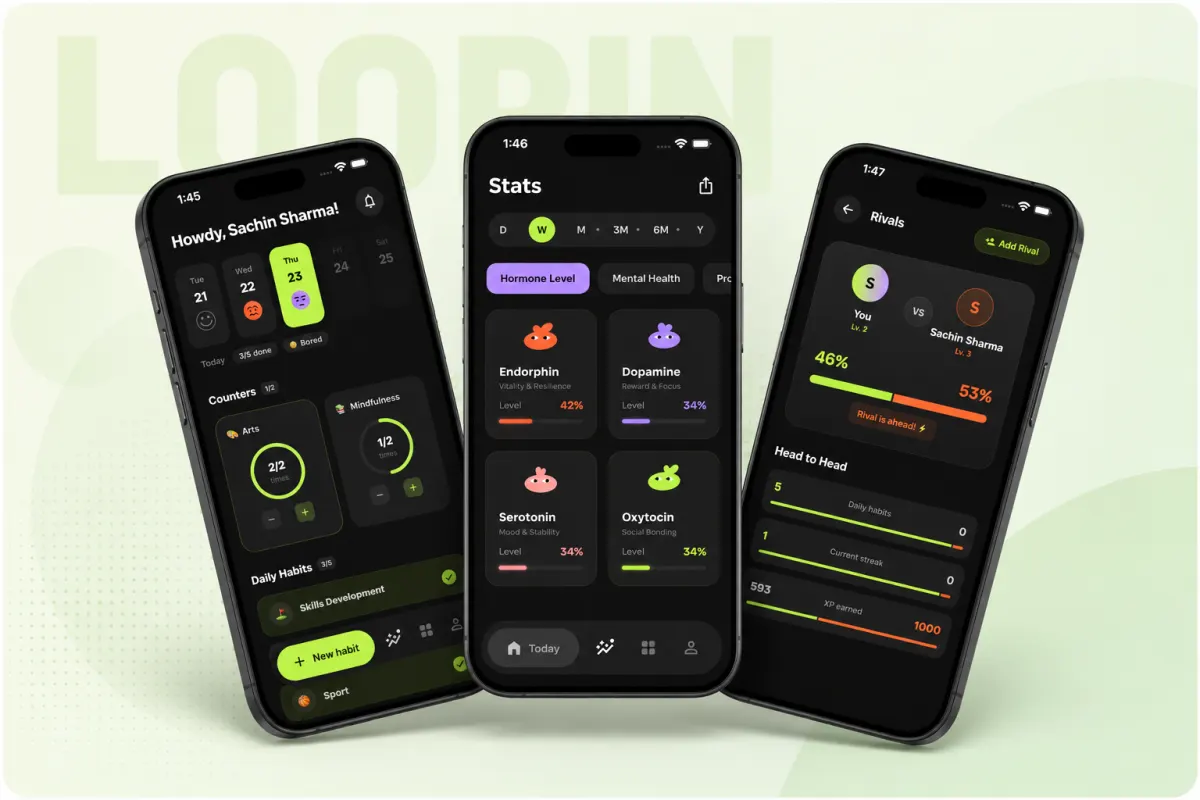
- RPG-style habit tracking with streaks and rewards
- Offline-first data layer with atomic sync to Google Drive
- Head-to-head view to compare habits with friends
Not every app needs a backend. Removing the server cuts costs, liability and failure points. Ask if your app truly needs one.
Keep going