Service
Mobile app development in Flutter
One codebase for Android and iOS, built offline-first when your users cannot count on a signal, by the person you speak to.
The full explanation
What is a mobile app, when do you need one, and what problems can it solve?
A mobile app is a program built to run on smartphones and tablets, giving users fast access to tools or services. Some apps work when the internet is poor or offline, unlike websites which often need a constant connection. You can open an app with one tap, and it can use phone features like the camera, GPS or notifications.
You need an app when your business goals require speed, offline use, or deep customer engagement. For example, e-commerce businesses may want a custom shopping app to keep customers coming back. If you are a startup, you might build a minimum viable product (MVP) to test your idea quickly before spending more. An MVP includes only the features that are likely to provoke interest in your product.
Enterprises often use apps to update old systems or add smart features like AI. A habit tracker like Loopin, for instance, works offline and syncs later to Google Drive. This solves the problem of users losing progress when the network drops.
A website is open to anyone with a link. An app gives you more control over the experience and data. But an app is worth the cost only if these benefits matter to your users. If your service works fine in a browser, a website may be enough.
To decide, ask: will my users open this daily? Do they need it offline? Must it feel fast and native? If yes, an app can help. If not, consider a website first. You can always build an app later.
Understanding what an API is helps you see how apps connect to payment systems, databases or AI tools. For a quick commerce business, check whether to build or buy a quick commerce app based on your scale and budget.

What does mobile app development cost in India, and what hidden costs should you watch for?
You cannot know the exact cost without defining your app's features, platform and complexity. Because professional developers need these basics to give an accurate estimate. Pricing talks are necessary but often hard, so focus on transparency from the start.
Quotes vary because each app is different. A simple app with five screens costs less than one with user accounts, payments and live updates. The team's experience, location and tools also affect price. Without clear scope, even similar apps can have very different costs.
To get a transparent estimate, share your key features and ask for a ballpark number with the assumptions behind it. For example, ask: "What would a Flutter app with login, profile, booking and payment cost, assuming two months of work?" This forces the developer to show their thinking.
Low quotes can be risky. If a quote seems too good to be true, corners may be cut in testing, security or scalability. These apps may break under real use or fail audits. Fixing them later costs more than building right the first time.
Unclear scope can lead to cost overruns. If you do not define what the app should do, developers guess. Later, when you ask for changes, it counts as extra work. If you do not explain your ideas clearly to the developer, the app process may get delayed and the cost may rise.
Ask for a breakdown of features and timelines to help compare offers and avoid surprises.
work out your app cost to see how features affect price. Also read our guide on how to hire a developer in India for full tips.
How long does it take to build a mobile app?
Creating a requirements document takes 1 to 2 weeks for a simple MVP and 4 to 8 weeks or more for a complex app. Unclear requirements lead to delays and cost overruns.
Poor communication between you and the developer can delay the project. Failing to explain your ideas clearly can push back timelines. It can also raise costs.
You can speed this up by involving the developer early. Strong requirements documents are written together with the designers and engineers who will build the app. For example, if you want a delivery app with live tracking and payments, sit with the developer to map each screen. This avoids guesswork later.
If you rush the planning phase, you risk missing key steps like user permissions or offline mode. This means rework. A clear brief cuts confusion. It keeps the project on time. For a detailed example, see how to build a quick commerce app.
What are the steps in building a mobile app?
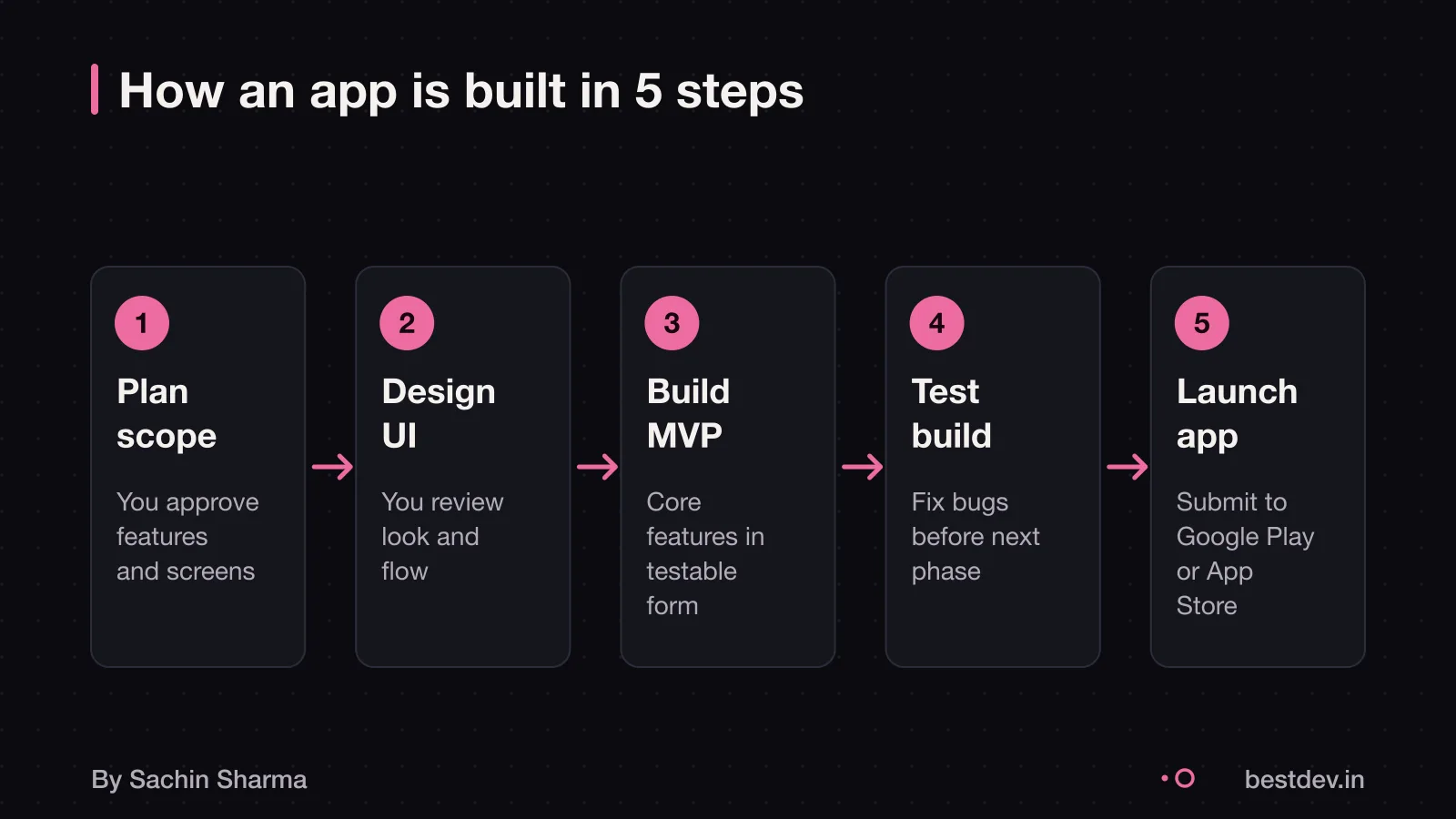
An app team plans, designs, builds and tests your app in stages, starting with a small working version called an MVP. You must clearly share your idea and what it should do. The team will then build more features over time.
An app team includes iOS and Android developers, UX/UI designers, project managers, QA engineers, and requirement analysts. These roles work together to turn your idea into a real app. The project manager keeps tasks on track, while designers make the app easy to use.
An MVP is the smallest version of your app that still solves your core problem. To create one, list all your ideas, then decide which features are critical for the first version and which can wait. Features that are nice to have can come later. This reduces cost and lets you test the app early.
You need to provide a clear list of features and goals. Explaining your needs clearly helps avoid extra work and delays. While detailed documentation is not mandatory, it can be useful during product development. Use our app brief template to start. This gives the team a strong base to estimate time, cost and effort.
Flutter vs native: what the evidence says
As a Flutter developer, Sachin uses this approach for mobile apps.
It is used in real apps like Loopin, a habit tracker that works offline, and Aashwasan, a contract management app. My Flutter app Loopin handles data offline using Hive and syncs later via Google Drive. This shows offline workflows are possible in Flutter.
For web apps with similar needs, you might also look at the React or Vue comparison.
What can go wrong, how to check progress, and what support is needed after launch?
Some apps fail because non-tech-savvy clients may not explain their app idea clearly. To avoid this, you must share your goals in plain terms and confirm the developer repeats them back correctly. If the developer disappears, you lose time and money, so always own the source code and app store accounts from day one.
You can verify progress by asking for working builds every two weeks. A real build runs on a phone and shows real features, not just designs. Professional teams use tools like Jira, Trello, or Slack to share updates and tasks. You should have access to these and check them weekly.
After launch, support may include bug fixes, performance monitoring, and updates. The developer is responsible for making sure the app works well for users. They are the only ones who can fix issues inside the app. If an app you’ve downloaded doesn’t work, you should contact the developer.
Bug fixes should be part of the first 30 to 90 days after launch. Major updates, like adding new features, are extra. OS updates may break your app, so the developer must test and fix it when Google or Apple releases new versions.
For ongoing help, check if your contract includes support. If not, you may need to pay extra. Know what you need before launch: monitoring, fixes, or feature updates.
12 checks to run before hiring can help you pick someone reliable. For full details, read after launch: the first month and the first year.

Who creates apps on Google Play?
Third-party developers, not Google, create most apps on Google Play. This means you must choose your developer carefully. Google Play does not intervene in your choice of app developer. So, you are responsible for picking a reliable partner who follows through.
Your app must follow Google’s rules to be listed. But the evidence does not say what those rules are. You should check Google’s official policy pages for the full list. One key area is user data. If your app collects personal information, you should check whether it must follow India’s DPDP Act consent rules, such as clear notice and user permission. See a legal professional to confirm your app’s compliance. For help with this, see our guide on DPDP Act consent flows.
Can you take the code elsewhere?
Without a clear contract clause, you may not have the right to share the code with another developer.
As a rule, do not give a developer full access to your systems or code before they have quoted for the work. Instead, share only what is needed to get a quote. Full access comes after you choose them.
For more, read our guide on can I get the source code? to understand how ownership works and what to ask for.
How to start working with a developer
Write a short brief under 250 words. Include what the app is and who uses it. Include the one job you want done. Say what is not part of that job. Say what the app was built with, where it runs, what fixes you have tried, and what access you can give and when. This gives a developer enough to quote, for many cases without a call first. Send a one-paragraph summary if you have documentation. Do not send the full file.
In your first message, do not send code or give access yet. Instead, say what access you can provide and on which date. A developer needs these six items to give a real price. Reading code is not required. Three items describe the app. Three describe the job.
Avoid micromanaging. Trust your developer to do their work, but stay involved to ensure the app matches your vision. A good developer will help you write the plan. They will not skip it to quote a price straight from your feature list. Clear collaboration terms save time and money. Keep communication open. Focus on outcomes.
For a proper quote, send the six key items listed above. A link to the app helps, but never replaces them. If you do not know something, leave it blank. An honest blank tells the developer to check. That cost is built in.
When this advice is wrong for you
- You should not build a mobile app if your goal can be met with a simple website or WhatsApp updates. Many small businesses see no return on app costs when a basic site or social media page would do. Ask yourself: does my customer need to use this daily, offline, or with phone features like camera or GPS? If not, skip the app.
- This advice is not for you if you need deep hardware access, such as augmented reality, Bluetooth sensors, or background location tracking. These often require native development, not cross-platform tools. In such cases, talk to a developer who specialises in Android or iOS only.
- If your budget is under ₹3 lakh, a full app may not be feasible. Even simple apps can go beyond this. Instead, start with a clickable prototype or a no-code tool to test your idea. Only move to custom development when you have clear user demand.
Questions people ask
What should I check before hiring for mobile app development?
Check the developer's portfolio for the complexity of apps they have built. The industries they have served, and whether their past projects match your product vision. Ask how they handled past challenges and confirm they do not ask for code access before quoting. Helped 150 startups and developing companies bring their vision to life.
What is a fair way to pay for mobile app development?
Pay in milestones tied to working builds, not hours worked. This keeps both sides aligned on progress. A good developer will help you write your app plan based on your feature list. Start with an MVP to test value before adding more.
What should be in the contract about code handover?
Agree in writing that you will own the source code and that it will be handed over fully. Without such a clause, ownership may remain with the developer.
Can the app work without internet?
Yes, if built with an offline-first approach. Some Flutter apps, like Loopin, store data locally and sync when connection returns. This is useful in areas with poor network. Confirm this design with your developer if offline use is important for your users.
Do I own the source code after development?
Yes, you own the source code only if your agreement says so. Without that clause, legal ownership may stay with the developer. Always get this in writing before work begins.
How do I know if my app idea is good?
Test your idea with a small group of users or build an MVP with core features first. See if people use it and give feedback. A developer can help you spend your budget wisely based on your goals.
What if my developer misses a deadline?
Check progress weekly using tools like Jira or Trello to catch delays early. If a deadline is missed, review what caused it and adjust the scope or timeline. Clear communication helps fix issues fast.
Should I hire a freelancer or an agency?
A freelancer works well for small, clear projects. An agency suits larger apps needing designers, testers and project managers. See our full comparison to decide which fits your needs.
How do I protect my idea when sharing it?
You do not need to share code or give access before a quote. Share your idea in plain terms and use an app brief template to structure it. Avoid sending sensitive data until you choose a developer.
Assumptions behind the numbers
- Offline-first design is part of the initial scope discussion.
- The developer works directly with the client, not through an agency.
- The budget threshold of ₹3 lakh reflects realistic expectations for quality work.
One codebase for Android and iOS, built offline-first when your users cannot count on a signal, by the person you speak to.
The deal
What is in it, and what is not
- 01A written scope
Screens, features and integrations listed in plain language, with the things left for version two named.
- 02Design you can react to
Key screens and the main flow drawn before they are built, so you change your mind on paper, not in code.
- 03The app itself
Flutter for Android and iOS, with offline behaviour decided up front rather than patched in later.
- 04Testing builds every milestone
Something real on your phone at the end of each milestone, not a demo at the end.
- 05Store submission
Listings, builds and submission on Google Play and the App Store, under accounts you own.
- 06Handover
Source code in your repository, accounts and keys in your name, and a short document on how it fits together.
How it runs
Four milestones, each one testable
- 1Scope and flow
You can test: A written scope and the main user flow, agreed.
- 2Clickable core
You can test: The core journey working on your phone, with placeholder content.
- 3Feature complete
You can test: Every in-scope feature present and testable.
- 4Store ready
You can test: Release builds, listings and submission done; handover started.
Fit
Right for you, and not
Right for you if
- You have a clear user and one problem to solve first.
- You need Android and iOS together and want to keep cost sane.
- You want to talk to the person writing the code.
Look elsewhere if
- You need a large team across many specialisms at once.
- You need a game engine or heavy native hardware work.
- You want a fixed number on a one-line brief with no scope.
Price
How it is priced
Price follows scope, not hours I happen to spend. You get a written scope first, then a price split across the milestones above, with a stated process for changes. A single lump sum on a vague brief is where projects go wrong.
Before you sign anything, with anyone
Five questions to ask
- Who exactly will write my code?
- What is not included, written down?
- What can I test at the end of each milestone?
- Whose name are the store accounts and repository under?
- What happens if we stop halfway?
Quick answers
Questions
Why Flutter?
One codebase produces both Android and iOS apps, which cuts cost and keeps the two in step. It suits most business apps; it is not the answer to every problem.
Can the app work without internet?
Yes, if it is designed for it from the start. Offline behaviour is decided in the scope, because retrofitting it is expensive.
Do I own the code?
Yes. The repository and store accounts are set up in your name from the start.
Keep going