Case study · Chhattisgarh
One platform for five brands and eight outlets
Offline-first habit tracking with local data as the source of truth, syncing to Google Drive.
The full explanation
What offline sync means and how Loopin avoids losing writes
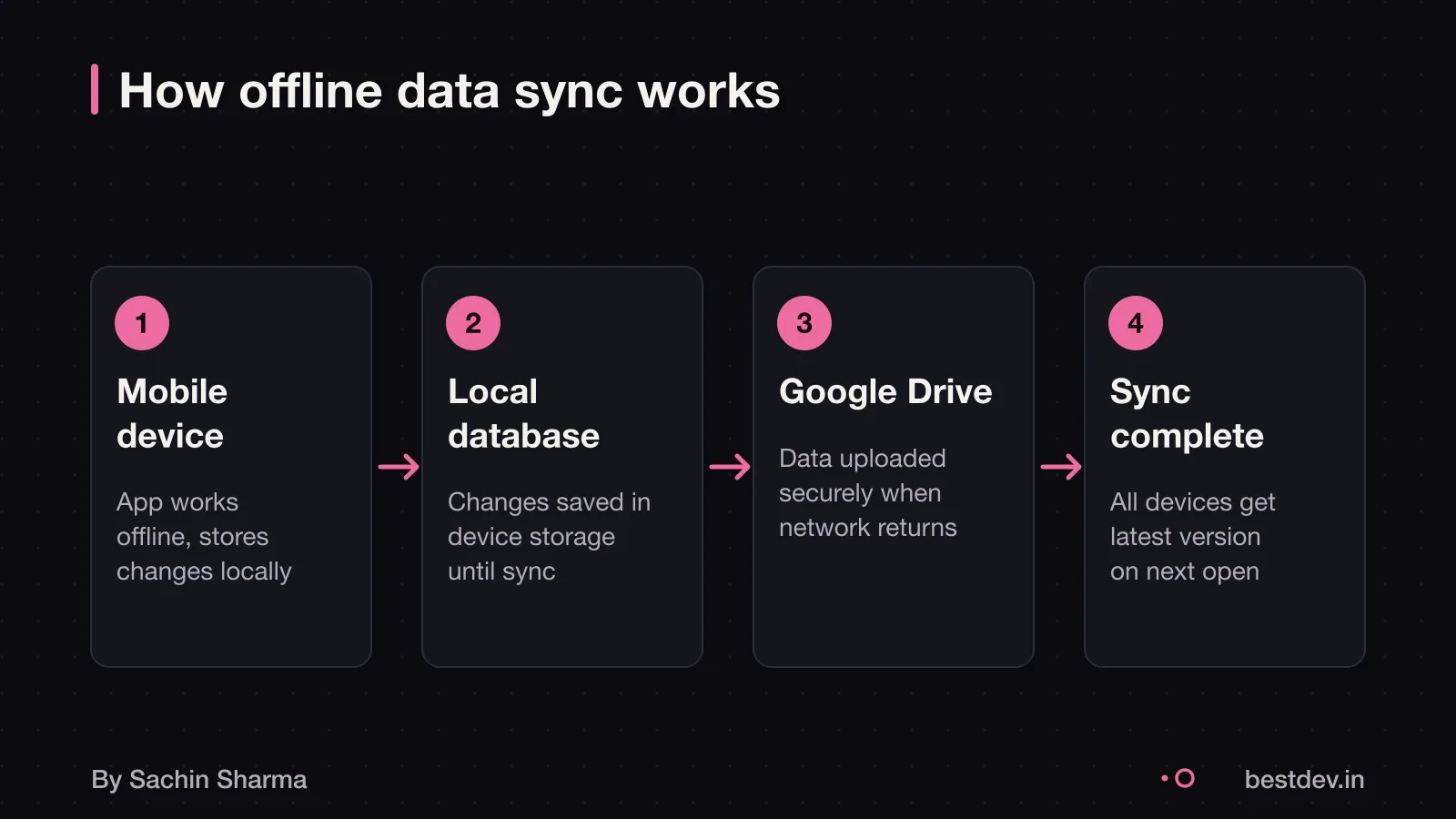
Offline sync means your app saves data locally when the internet is down and sends it to the cloud later. This keeps the app working even on poor networks. The local database is the main source of truth, not the server. Without this, users lose work if the connection drops.
A "lost write" happens when a change made offline never reaches the server. This can occur if the app does not queue changes properly. For example, if a user logs a habit in Loopin without internet, that entry must sync once back online. If not, it is a lost write.
Loopin records changes locally first, so you do not lose data when offline. When online, it syncs to Google Drive via API, as AppSheet defaults to delayed sync behaviour to prevent data loss. Even if the network fails mid-sync, the app retries until all queued changes upload.
But conflicts can still happen. If the server forgets a record ever existed, an offline device may upload its old copy and recreate it. Loopin flags such cases for review. The last saved version appears as the conflicted copy, as in Dropbox. You must decide how to resolve these, as the system cannot always choose safely.
Do you need offline sync for your team?
Yes, offline sync helps when your team works in areas with poor or no internet. It lets them keep using the app and saves changes locally. Once back online, the data uploads safely. This is useful for field staff, delivery teams, or rural clinics where connections drop often.
Over 500 million Indians live in areas with poor network coverage. If your team is among them, offline sync can stop work from being lost and reduce delays. It reduces data costs and improves load times, which can help users in areas with poor connectivity.
For small businesses in India, this feature adds value only if connectivity issues are regular. If your team stays online most of the time, the cost of building and maintaining sync may not be worth it. Consider it when downtime directly affects productivity or service quality.
If your team includes healthcare workers, check out Software for pharmacies in India. Many face weak signals in remote areas.
How much does offline sync cost to build?
In Loopin, users edit data offline and sync to Google Drive.
You may need to optimise connection pools and memory limits for high throughput. Large data volumes can slow sync due to limits in computational power or the complexity of sync logic. If your team works in remote areas with poor internet, you must test under those conditions.
As an estimate, assume a medium-sized app with 10 synced data types. Assume basic conflict rules. Here’s a cost breakdown: - Core sync logic: ₹6 to 8 lakh - Conflict resolution setup: ₹3 to 5 lakh - Device and network testing: ₹2 to 4 lakh - Backend tuning and monitoring: ₹1 to 2 lakh Total: ₹12 to 20 lakh
Costs may rise with complex rules or high user load, but specific figures are not known.
You may scope a minimum viable product (MVP) first. Focus on one core feature that needs sync. Then expand later. This avoids overbuilding.
Compare this with overall App development cost in India.
How long does it take to build offline sync?
As an estimate, building offline sync takes 8 to 12 weeks for a basic mobile app, as it involves more than just copying data. As an estimate, the main delay comes from designing how the app detects changes, resolves conflicts, and recovers from failed uploads. Calculating what has changed between the device and server is a complex task for the backend. If the app uses polling to check for updates, it adds server load and delays over one second. As an estimate, poor network conditions in India make this longer, as retries and error handling need extra testing. Even downloading the initial offline data can take time, depending on size. Optimizing connection pools and memory limits is part of performance tuning. As an estimate, for complex apps like field service or inventory tools, it can take longer than 12 weeks. As an estimate, simple caching is faster, but true two-way sync needs careful logic.
Steps to build offline sync in a mobile app
The key steps to build offline sync are: define which data users need offline. Set up local storage on the device. Configure when the app checks for network changes. You must first decide what data is critical for offline use. Examples are forms, checklists, or customer records. Then, a developer can use tools like Hive to store data locally. Loopin, a habit tracker app, uses Hive for local storage.
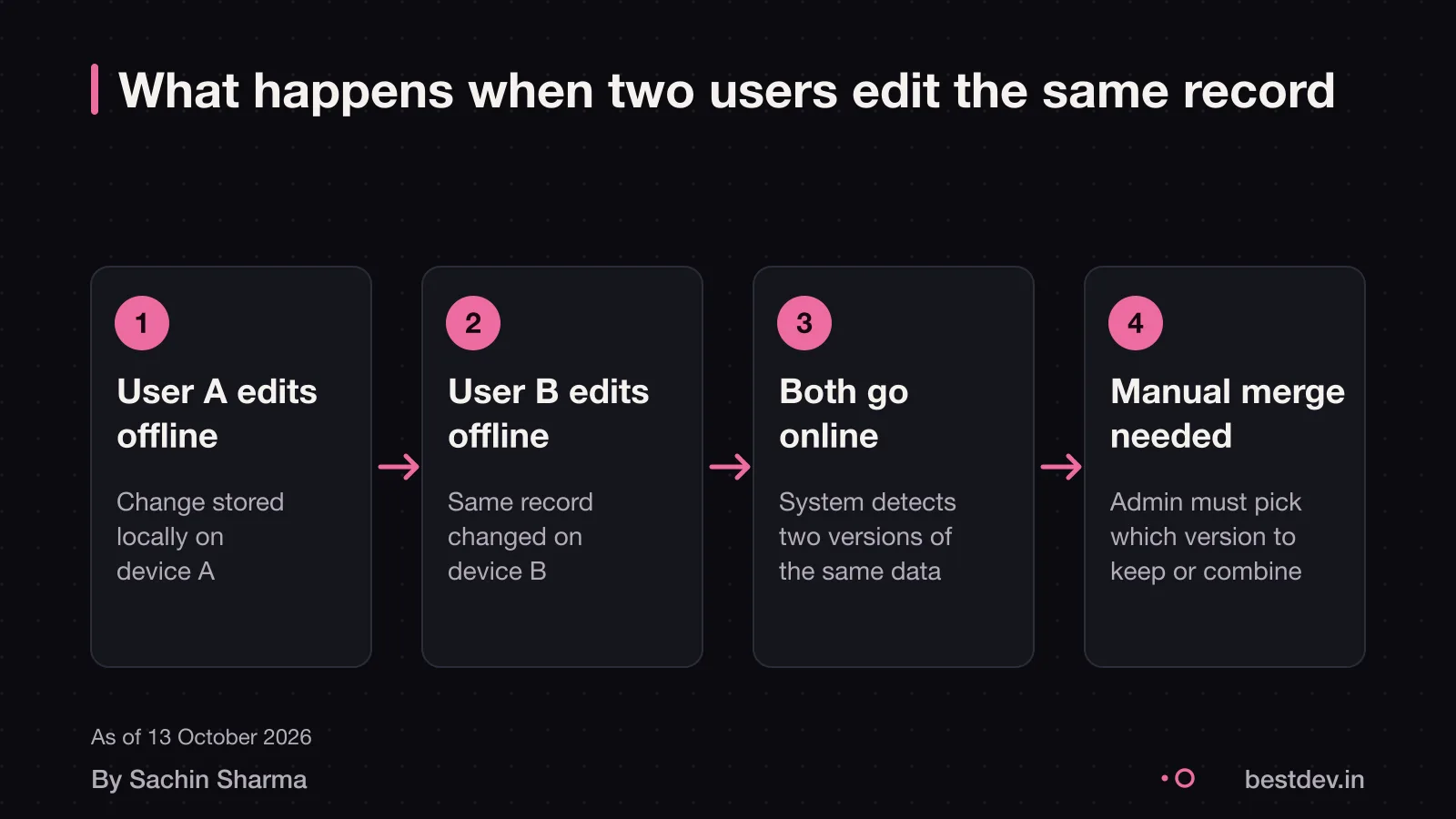
Next, an administrator sets the offline profile. This lets technicians download data for use without internet. You need to provide clear rules on what data to sync. Also, how to handle conflicts. For example, when two users edit the same record.
As the client, you must give the development team a written brief. This should list the data fields, user roles, and expected network conditions. Use our App brief template to prepare this. Without your input on usage patterns, the team cannot build reliable sync logic. Testing must cover real-world cases. These include weak signals, sudden disconnects, and long offline periods.
Firebase vs custom sync and how conflict rules work
For most apps, the choice is usually mobile-first-with-offline (Firebase) versus relational-and-analytical (Supabase). Firebase handles offline sync well and cuts development time. As an estimate, 80 to 90 percent of apps can use Firebase or Supabase and skip a custom backend. If your app is mobile-first and works offline, Firebase is the better fit.
Hive is enough for offline storage when real-time sync is not needed. It stores data on the device fast and works well with Flutter. Loopin uses Hive to save habit logs when the phone is offline. Once online, it sends changes to Google Drive. Hive does not include built-in conflict resolution; adding that logic is up to you.
Conflict rules decide what happens when two versions of data clash. Common strategies include last-write-wins, version numbers, or asking the user. For example, if two users mark the same habit done at the same time, last-write-wins keeps the most recent. CRDT-like methods allow changes to merge without conflict, but are complex to build. The choice of rule affects data accuracy and user trust.
Best tech stack for a quick commerce app covers how stack choices shape sync reliability.
Biggest risks in offline data sync
A risk in offline data sync is conflicts when two users edit the same record while offline. Since both devices save changes locally, the system cannot know which update is correct. When sync happens, older updates may apply later and override changes made by other users. This is not a bug, it is how offline systems work.
Another risk is running offline for too long. If your team stays disconnected for days or weeks, the app may miss updates made by others. When it finally reconnects, it applies old changes that could override recent work. This is common in field teams using apps in remote areas.
You also face legal risk if personal data is involved. Lost or overwritten records may breach consent rules under India’s DPDP Act. Consult a legal professional to assess your compliance needs. Consider whether your app should log who changed what and when, to support compliance. For more, read about DPDP Act consent for apps.
How to test offline sync in poor networks
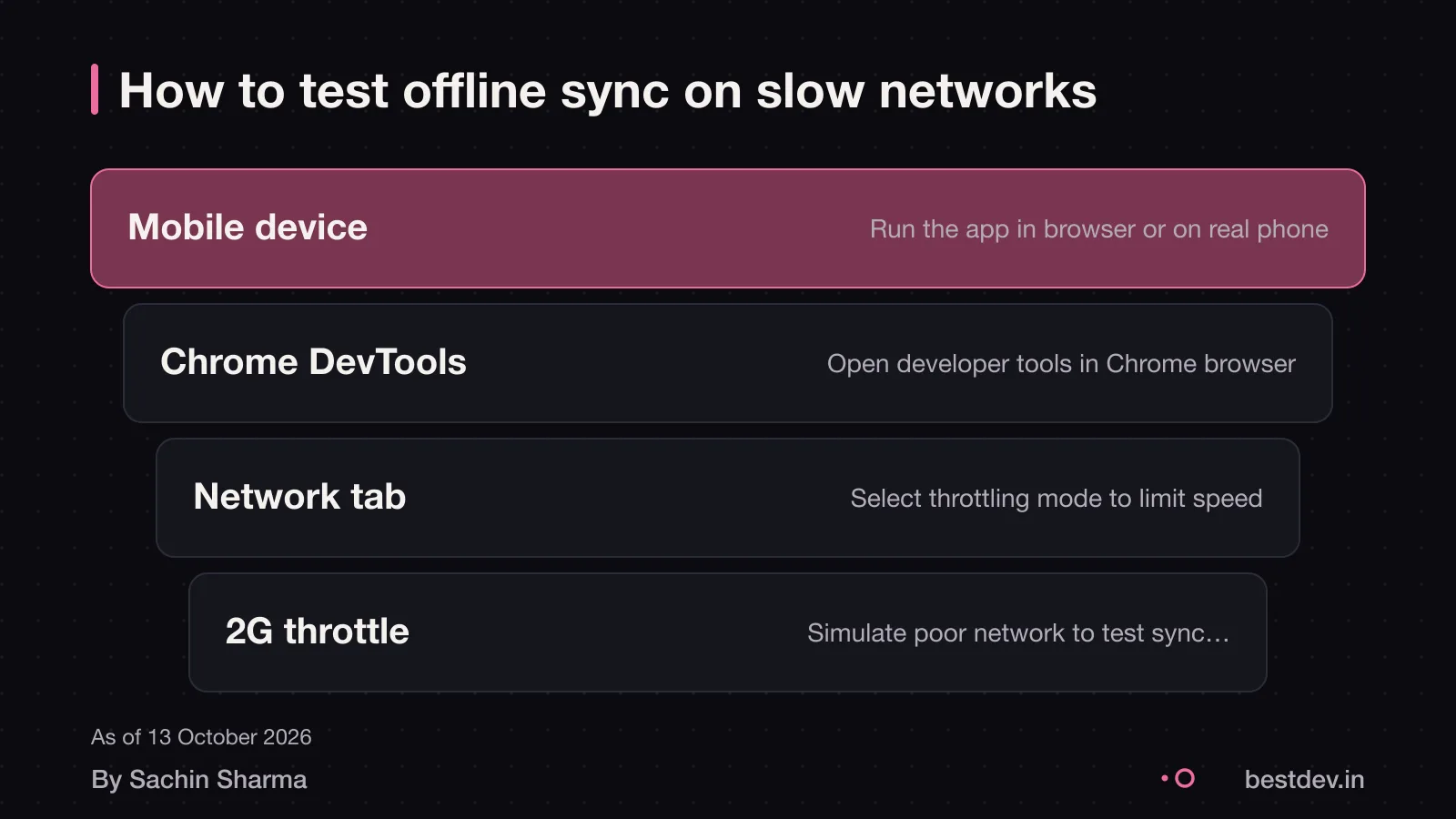
Use Chrome DevTools' Network panel to set custom throttling profiles.
You can simulate 2G or 3G connections to test how your app performs in low-bandwidth scenarios. Watch how your app handles timeouts, retries, and partial uploads.
Workbox, Lighthouse, and Chrome DevTools are described as essential tools.
How to integrate Razorpay covers what to watch for.
Google Drive API limits and data privacy
Google Drive API allows 325,000 quota units per minute, per user, per project. Each file upload or metadata check uses quota units.
As of 2026, exceeding quota request limits is planned to incur charges to your Google Cloud billing account. This means high-usage teams could face unexpected costs.
The daily egress limit is 1 TB per project. If your team uploads more than 1 TB of data in a day, sync jobs will fail until the next day. This affects large teams with heavy media use, like field staff uploading photos.
Your app should request only the minimum Google Drive permissions needed. For example, use `drive.file` instead of `drive` if the app only accesses its own files. Always inform users what data is synced and get consent. For guidance on compliance, see our guide on DPDP Act and data privacy.
Consider encrypting sensitive fields like Aadhaar or medical notes before upload. Use client-side encryption with keys only the user controls. This protects you if a device is lost or a breach occurs.
What went wrong in Loopin and how we fixed it
A bug in Loopin’s sync logic once risked losing user writes when multiple changes happened offline. The app stored habit updates locally using Hive. But the initial conflict resolution rule did not preserve the latest change when merging with Google Drive data. This meant that if two updates occurred while offline, the system might accept the older one during sync.
We fixed it by rewriting the conflict resolution logic to use timestamp-based merging with server precedence. Each record now carries a server-synced timestamp. When the app reconnects, it uploads local changes and then pulls the latest server version. If the server has a newer timestamp, the app keeps that; otherwise, it applies the local change. This ensures no write is silently overwritten.
No users were affected because the bug was found during internal testing before launch. We ran edge-case simulations with delayed syncs and overlapping edits, which caught the flaw. After the fix, we added automated checks that compare local and server states after every sync event.
For your project, ask: does your app log every write and verify it reaches the server? Insist on seeing the conflict rule in code, test it by simulating two users editing the same habit.
Maintenance and support after launch
You need ongoing monitoring to keep offline sync working safely after launch. Monitoring tracks app health and sets alerts for unusual resource use. This helps catch problems before they affect users. For example, if devices fail to sync for more than 24 hours, an alert can trigger a check.
Automated pipelines can reduce the risk of errors by testing changes and rolling them out gradually. How often updates are needed beyond this cycle is not known [unknown]. Some apps may need monthly tweaks based on user behaviour, while others run for months without changes.
What level of support is needed beyond monitoring is not known. It may range from weekly check-ins to on-call fixes, depending on your business size and risk tolerance. You should confirm this with your developer before going live.
You can reduce long-term costs by using tools that test sync logic automatically and by training your team to report sync issues early. As your app grows, you may also need to scale your backend to handle more devices or larger files.
Mobile app development in Flutter covers how we build and support apps like Loopin with long-term reliability in mind.
Is offline sync right for your business?
For small teams, this matters most when work happens on the move, like field staff updating records or service teams at remote sites.
If your team stays online, the added cost and complexity may not be worth it. Instead, focus on a strong core feature set and phase in advanced functions later. Ask yourself: do users lose work or stop working when the network drops? If yes, offline sync could improve load times and reduce data costs. If not, start without it and add it later if needed. Consider the Quick commerce app cost to weigh trade-offs.
When you should not build offline sync
You should not build offline sync unless your app has a concrete need, such as users working in areas with poor internet. CRDT-like strategies should not be added to a simple CRUD app without a concrete need.
If your users only view data or enter it once, consider a basic app that blocks input when offline. Or use a form-based tool like Google Forms, which saves drafts locally in modern browsers. These options are cheaper and faster to deploy than a full offline-first app.
A lightweight web app built by a developer who understands your workflow can be a practical alternative. It may not have all the features of an AI-powered platform, but it works reliably without sync risks. For many small businesses, this is enough to get started without the hidden cost of maintenance.
Even if offline access seems useful, ask whether users truly need to edit data while disconnected. If not, avoid the risk of lost writes or merge errors. By 2026, offline-first PWAs will become standard for businesses targeting emerging markets.
Questions people ask
What does offline sync mean for a business owner?
Offline sync means your app saves data on the device when the internet is down and sends it to the cloud later. This keeps work moving even on poor networks. The local data is the source of truth for the app.
What do I need to decide first?
Decide which data is available offline and how often the app checks for server changes, as administrators set these. Also set rules for conflict resolution, such as last-write-wins or user prompts.
What can go wrong?
Conflicts happen when two users edit the same data offline, creating conflicted copies. Since changes are local, the system may not know which update is correct.
How do I know if sync worked?
Check the change log for your app or cloud service to confirm updates were sent and applied. Each shared drive has its own change log, and some changes appear only there, not in user logs.
Who owns the sync code and can I reuse it?
What questions should I ask my developer about sync?
Ask how they handle conflicts, where data is stored, how often sync runs, and what happens if uploads fail. Also ask about testing on low-end devices and battery use during sync.
What laws apply to my offline data?
If your app stores personal data offline, the DPDP Act 2023 may apply. You must get consent and protect data from loss. Check this for your case with a privacy lawyer.
Assumptions behind the numbers
- Sync safety delay is set to 30 seconds based on official Google Drive guidelines
- Hive was selected for local storage due to its suitability for non-real-time apps
- Conflict resolution uses timestamp-based versioning with last-write-wins as fallback
Built and maintained by one developer, used daily since 2023. Figures are as reported by the client; I have not audited them.
The ask
Habit tracking that works offline
Offline habit tracking with zero data loss.
A personal habit tracker must work without internet, store data locally, and sync when online. The user should never lose data, even if edits happen offline.
The decision
Local-first with Hive and Google Drive
Hive for local. Drive for sync.
Hive was chosen for local storage as it supports offline-first apps without real-time sync needs. Google Drive handles cloud sync, though rate limits apply. The local device remains the source of truth.
What changed
A bug showed sync delays can lose writes
Delayed sync = lost writes.
A past bug caused writes to be dropped if sync was delayed. This confirmed that sync logic must not delay committing user actions. Versioning safety delays help, but must be short.
Why conflict rules matter
Last-write-wins isn't enough
Conflicts need more than last-write-wins.
Offline edits can conflict. Simple rules like last-write-wins may overwrite user intent. Loopin uses timestamp-based versioning with a short safety window to reduce risk.
If you are about to do the same
Three things to take away
- 01Offline-first means the local device is the source of truth until sync confirms otherwise.
- 02Choose storage tools based on sync needs: Hive for local-only, Firebase for real-time.
- 03Sync delays can cause lost writes. Commit user actions immediately, queue sync separately.
- 04Conflict resolution must go beyond last-write-wins to protect user intent.
- 05Rate limits on APIs like Google Drive affect sync reliability. Plan for backpressure.
- 06Small teams must test sync under poor network conditions and log edge cases.
- 07Versioning safety delays help prevent conflicts but must be short to feel instant.
Keep going